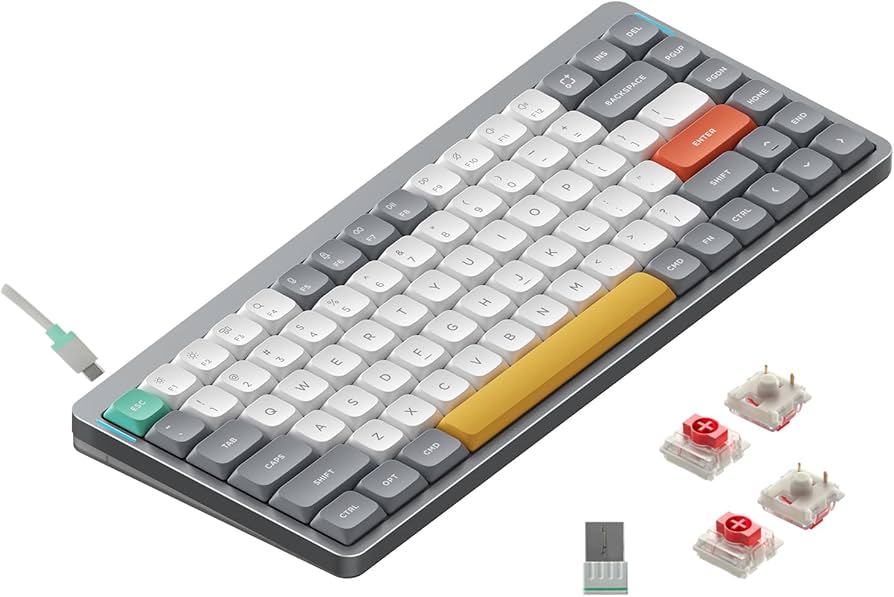
NuPhy Air75 V2: Revolutionizing Low-Profile Keyboards for Ultimate Typing Experience
Introduction
Imagine typing on a keyboard that feels like an extension of your fingers—responsive, quiet, and effortlessly portable. That’s the magic of low-profile mechanical keyboards, and the NuPhy Air75 V2 stands out as a prime example. In a world where keyboards are more than just input devices—they’re tools for productivity, gaming, and even self-expression—the Air75 V2 brings fresh innovation to the table. Whether you’re a coder hammering out lines of code or a writer chasing that perfect flow, this keyboard promises to elevate your experience without the bulk of traditional mechanical setups.
Thank you for reading this post, don't forget to subscribe!What sets the NuPhy Air75 V2 apart? It’s not just another compact keyboard; it’s a refined evolution that blends sleek design with high-performance features. Drawing from user testimonials and expert reviews, I’ve dived deep into what makes this device tick. Let’s unpack its specs, compare it to rivals, and share some unique insights that go beyond the basics.

Amazon.com: nuphy Air75 V2 Portable 75% Mechanical Keyboard,Wireless Keyboard,Supports Bluetooth/2.4G/USB-C RGB Gaming Keyboards,Compatible with Windows/Mac OS/Linux Systems Grey-Gateron Red Switch : Video Games
Design and Build Quality
The NuPhy Air75 V2 boasts a minimalist aesthetic that’s both functional and eye-catching. At just 316.4mm x 132.5mm x 13.5mm and weighing 598 grams, it’s incredibly portable—perfect for slipping into a backpack or even resting on your laptop’s built-in keys thanks to its foldable AirFeet V3 stands. Available in colors like Ionic White, Basalt Black, and Lunar Gray, it features an aluminum frame with an ABS bottom case, giving it a premium feel without the heft.
One standout element is the double-shot PBT keycaps, which are half the thickness of standard ones for better backlight shine-through and durability. The RGB lighting isn’t just for show; it includes 40 modes with side lights that indicate battery level, caps lock, and connection mode. Users on X rave about its “delicious” switches and layout, with one calling it “ESTÁ DEL CARAJO!” after switching from a Logitech model.
From a fresh perspective, think about how this keyboard integrates into modern workflows. In an era of remote work and AI-assisted tasks, its low-profile design reduces wrist strain during long sessions—ideal for iterating on code or drafting reports with tools like Grok.
Features and Performance
Diving into the tech, the Air75 V2 supports tri-mode connectivity: Bluetooth 5.1, 2.4GHz wireless (with a groundbreaking 1000Hz polling rate for low latency), and USB-C wired. This makes it versatile across macOS, Windows, Linux, Android, and iOS. The 4000mAh battery lasts up to 220 hours with lights off or 35-57 hours with them on, a 60% improvement over the V1.
Switches are hot-swappable, offering options like Gateron Low-Profile 2.0 (Red, Brown, Blue) or NuPhy’s custom ones: Aloe (linear, 37gf), Cowberry (linear, 45gf, short pre-travel for gaming), Wisteria (tactile, 55gf), and Moss (tactile, 60gf with early bump). QMK/VIA support allows endless customization, from key remapping to macros— a boon for power users.
Performance-wise, reviews highlight its excellent latency for gaming, rivaling full-height keyboards. Sound engineering includes poron foam and silicone for a thocky, satisfying type without excess noise. One reviewer noted it’s “not just good for a low-profile board—it’s just good,” praising its refined stabilizers and feel.

Low-Profile Keyboard vs Normal: What’s The Difference? – MelGeek
In my analysis, the Air75 V2 shines in hybrid scenarios. Picture using it for AI prompt engineering: the tactile feedback speeds up iterations, and its portability lets you switch from desk to couch seamlessly.
Comparison
To truly appreciate the NuPhy Air75 V2, let’s stack it against popular alternatives in the low-profile keyboard arena. We’ll focus on the Keychron K3 series and Logitech MX Keys Mini, drawing from specs, user feedback, and expert comparisons.
NuPhy Air75 V2 vs. Keychron K3 Max
Both are 75% layouts with hot-swappable switches, but the Air75 V2 edges out in battery life (4000mAh vs. 1550mAh) and polling rate (1000Hz vs. variable). The NuPhy offers more VIA layers (6 vs. 4) for customization, and its sound profile is often described as more refined with better stabilizers.
| Feature | NuPhy Air75 V2 | Keychron K3 Max |
|---|---|---|
| Battery Capacity | 4000mAh | 1550mAh |
| Polling Rate (2.4GHz) | 1000Hz | Up to 1000Hz |
| Switch Options | Gateron 2.0, NuPhy Floral | Gateron Low-Profile, Others |
| Weight | 598g | 580g |
| Price (Approx.) | $119.95 | $89 |
| RGB Lighting | Yes, with side indicators | Yes, RGB or White |
Users prefer the NuPhy for its “premium” feel and longer endurance, though the Keychron is cheaper and has dedicated media keys. For gaming, the Air75 V2’s low latency makes it superior, as noted in head-to-head tests.
NuPhy Air75 V2 vs. Logitech MX Keys Mini
The MX Keys Mini uses scissor switches, making it quieter but less customizable than the mechanical Air75 V2. The NuPhy wins on hot-swappability and RGB options, while the Logitech excels in multi-device pairing (up to 3 devices seamlessly).
| Feature | NuPhy Air75 V2 | Logitech MX Keys Mini |
|---|---|---|
| Switch Type | Mechanical (Hot-swappable) | Scissor |
| Battery Life | Up to 220 hours (lights off) | Up to 10 days (backlit) |
| Connectivity | Tri-mode (BT, 2.4G, Wired) | Bluetooth only |
| Customization | QMK/VIA | Limited via Logi Options |
| Weight | 598g | 506g |
| Price (Approx.) | $119.95 | $99.99 |
Reviewers highlight the Air75 V2’s tactile satisfaction over the MX’s membrane-like feel, though the Logitech is lighter and better for pure office use. One X user switched from Logitech and found the NuPhy’s switches “delicious.”
In broader comparisons, the Air75 V2 outperforms in gaming latency and build refinements, making it a top pick for mixed-use scenarios.
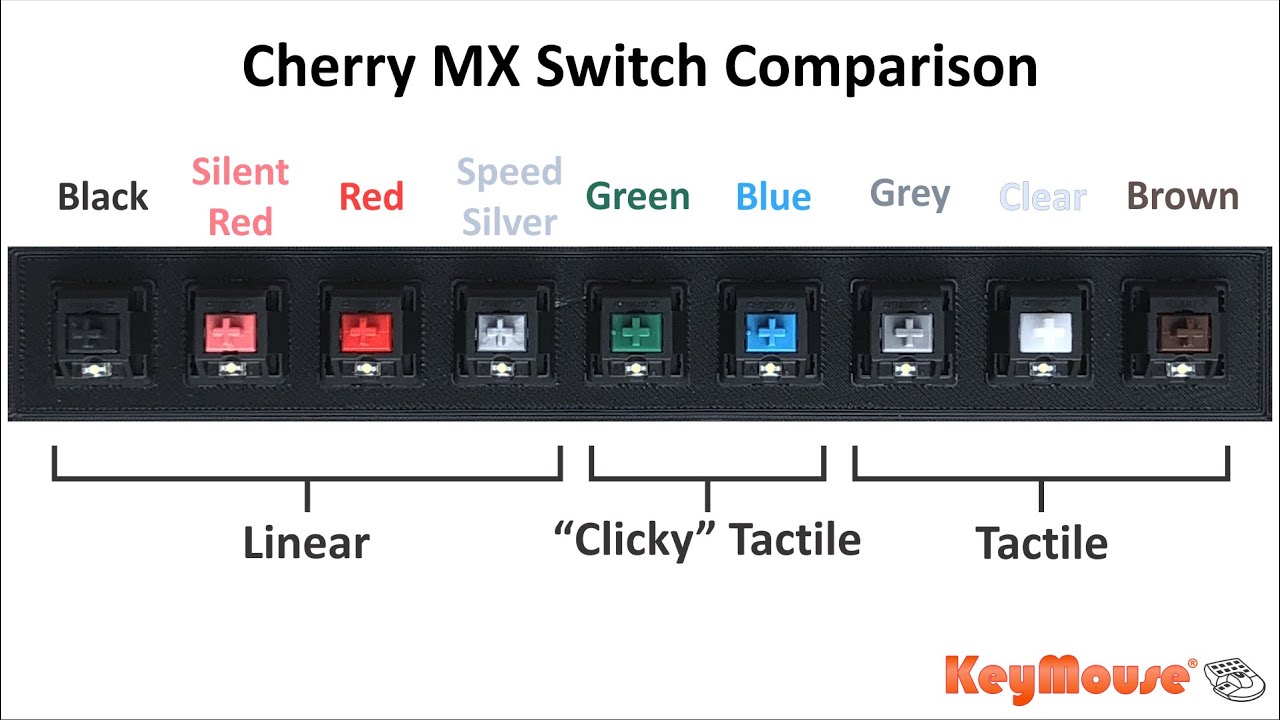
Cherry MX Switch Comparison – KeyMouse
Key Insights
Beyond specs, the NuPhy Air75 V2 offers unique value in its ecosystem. Accessories like the NuFolio V3 case or extra keycap sets (e.g., COAST Twilight for $24) allow personalization that’s rare in low-profile keyboards. From personal anecdotes in reviews, users love experimenting with switches— one mixed pressures for a custom feel.
A fresh perspective: In AI-driven creativity, like generating art or code, the keyboard’s rapid response (thanks to Cowberry switches) minimizes friction. It’s not just typing; it’s flowing ideas. Drawbacks? Some report VIA app glitches on Mac, but firmware updates mitigate this.
Rated 4.6/5 from 842 reviews, 91% recommend it for its Mac compatibility and gaming prowess. One user called it the “best keyboard ever” for heavy daily use.
For those eyeing upgrades, consider how it fits your setup. If you’re into custom mechanical keyboards, the Air75 V2’s hot-swappability opens doors to endless tweaks.
Conclusion
The NuPhy Air75 V2 isn’t just a keyboard—it’s a statement in efficiency and style. With superior battery, low-latency wireless, and customizable features, it outshines competitors like the Keychron K3 Max and Logitech MX Keys Mini in versatility. Whether for work, play, or creative pursuits, it delivers depth where others skim the surface.
If you’re tired of bland typing experiences, grab one from NuPhy’s site or Amazon. It’s an investment in better keyboards that pays off in comfort and productivity. What’s your take—ready to switch?